User Profile

JAAS
Active Contributor
Joined 18 years ago
User Widgets
Contributions
Re: Subject: Critical Disk Space Issue - waapi-XXXXXXXXXX Folders Accumulating in C:\Windows\Temp
We should, at least, get complimentary access to one2many in order to be able to depoy a remediation until you find a solution. I was able to remedy the issue for my AD joined devices but I have other computers were I have no option to remotely trigger scripts. one2many would help in those cases.82Views0likes4CommentsSubject: Critical Disk Space Issue - waapi-XXXXXXXXXX Folders Accumulating in C:\Windows\Temp
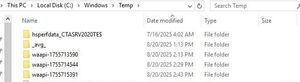
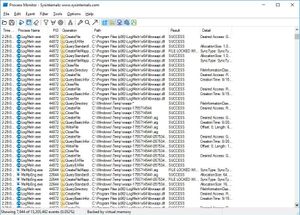
We are experiencing a critical issue across all our Central monitored devices caused by persistent accumulation of temporary folders in C:\Windows\Temp. Issue Details: Folders follow the naming pattern "waapi-" followed by 10 random digits (e.g., waapi-1234567890) Each folder contains a .sig file and hex-named authentication files Folders are created approximately every 15 minutes Folders are NOT being cleaned up automatically and persist indefinitely Accumulation rate: 500MB to 5GB per device per month Process Monitor traces confirm these are created by LogMeIn.exe processes Support suggested one-to-many or remote execution as possible culpript but we don't use any of those. Case #22000673 created. Impact: all monitored devices affected Timeline: Issue first observed around June/July 2025 Currently affects: Any device with LogMeIn.exe installed. Software versions: devices are on agent version 16128 Temporary Mitigation: We have implemented PowerShell scheduled tasks to delete these folders as a workaround, but this addresses symptoms rather than root cause. Request: Please confirm if this is a known bug and provide either: A permanent fix via software update Official guidance on preventing folder creation Internal cleanup utilities/scripts designed to address this issue This issue is documented in your community forums but lacks official vendor acknowledgment or resolution. User jeffrey_katz provided these screenshots in another unresolved community discussion. These reflect exactly what we are also seeing.198Views0likes6CommentsRe: Trouble logging in to virtual servers running 15702
This is happening to us too on a Windows Server 2012R2. In our case this is a physical server, not virtual. Moving back from 15702 to 15576 worked. I hope LogMeIn people fix this quicky but I'm pretty sure it's just a matter of time until every other computer in my account makes the update to 15702 and all hell breaks loose93Views0likes1CommentBring back computer name on mobile app.
When you opened the info section for a device in the mobile app you could see the computer name there. It was extremely helpful to know the computer name in case you needed to ping it from another system for example. In our case, the computer name is the device serial number so we knew the serial of the system without having to log in. Why was it taken away?1.1KViews0likes3CommentsComputer name (hostname) removed
Why was the hostname removed from the android client when looking at device information. This info was very useful for those cases when LogMeIn decides it can't connect. Can we get the hostname back in there? Is there a suggestions forum or form I can submit this to?985Views0likes1Comment