Forum Discussion

Blake_Eckert
23 days agoActive Contributor
Support Page No Longer Has Text Phone Guides
You removed the text Phone Guides page completely from the support website. Why? That was a useful resource. I don't want to have to watch a video to get the information I need when I am looking for the PIN GoTo sets for DECT cordless and conference phones. First, you made it much more difficult to find, then you removed it all together. That was a useful resource for partners and admins. Please restore it.
4 Replies
Replies have been turned off for this discussion
- GlennD18 days agoGoTo Manager
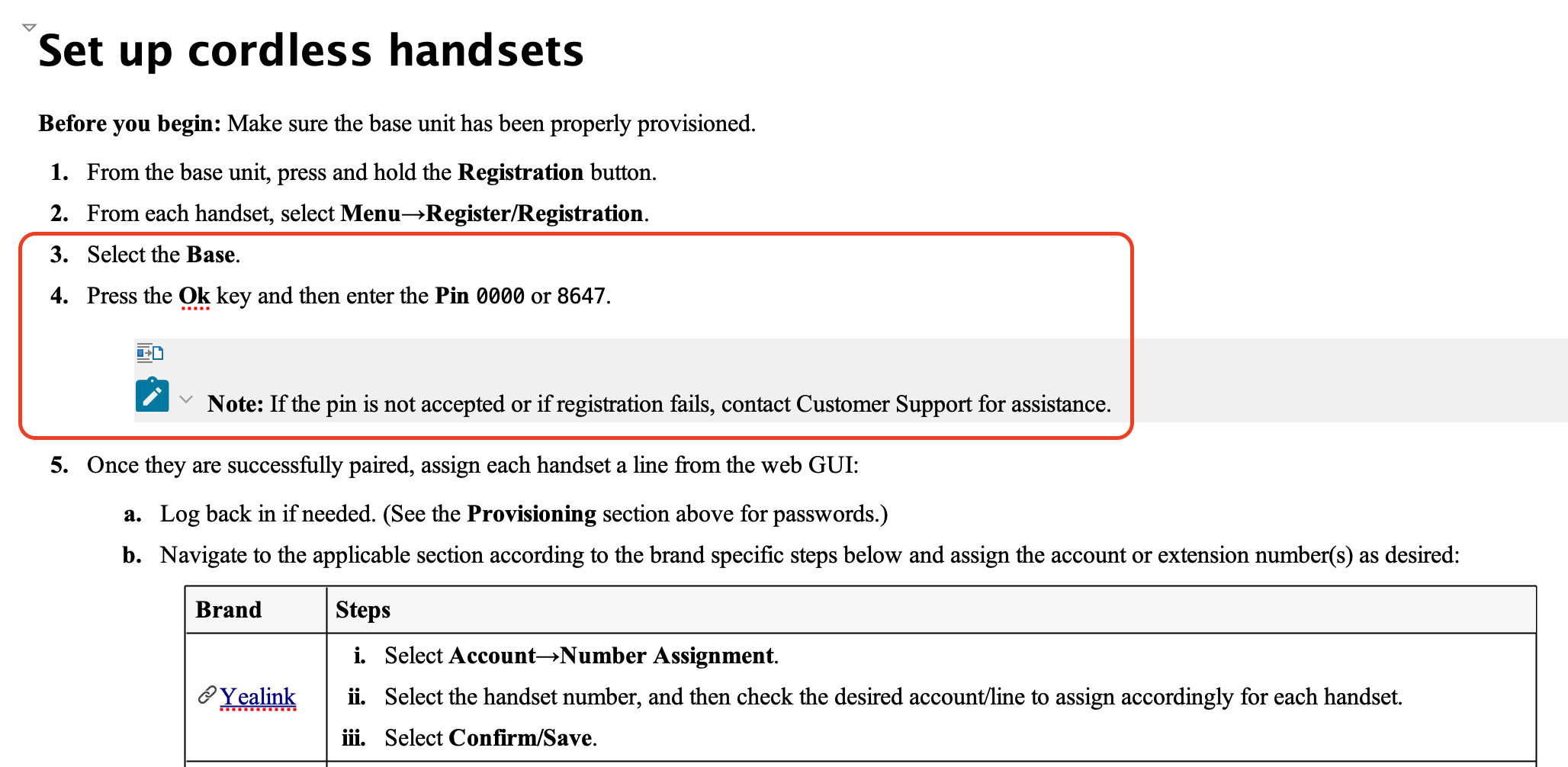
Hi Blake_Eckert, we have updated our combined hardware guide to include the missing PIN information that you reported. If there are any other specific elements missing please let us know.
 Blake_Eckert18 days agoActive Contributor
Posting my previous comment again as it has not been addressed yet as your answer is still not a solution to the problem at all:
I am aware of the new hardware user guide, and it is lacking. You already had a fine resource without having to leave the GoTo support site, something most websites prefer, but this resource doesn't have all the information because your provisioning changes the PIN to connect to a base away from the default for the Yealink DECT cordless phones and conference phones, and now there is nowhere on the support site to get what the PIN is. I had to call into the support line for it, turning what should have taken 5 seconds into a 5 to 10 minute call. This was also the SPECIFIC thing I referenced in my post which you do not address at all. I'm not saying the new page isn't completely useless, I am saying that it does not adequately replace what you already had. You can have this page for the quick basic information AND the previous phone guides for users that need more info, as well as for when you change things from the default settings that are not posted elsewhere.
- Blake_Eckert20 days agoActive Contributor
I am aware of the new hardware user guide, and it is lacking. You already had a fine resource without having to leave the GoTo support site, something most websites prefer, but this resource doesn't have all the information because your provisioning changes the PIN to connect to a base away from the default for the Yealink DECT cordless phones and conference phones, and now there is nowhere on the support site to get what the PIN is. I had to call into the support line for it, turning what should have taken 5 seconds into a 5 to 10 minute call. This was also the SPECIFIC thing I referenced in my post which you do not address at all. I'm not saying the new page isn't completely useless, I am saying that it does not adequately replace what you already had. You can have this page for the quick basic information AND the previous phone guides for users that need more info, as well as for when you change things from the default settings that are not posted elsewhere.
- KateG23 days agoGoTo Manager
Hi Blake_Eckert Happy New Year!
To make things easier for our customers, we’ve recently launched a new Hardware User Guide, which you can find here: GoTo Connect Hardware User Guide.
Based on customer feedback and support data, we found that the main area of difficulty was around provisioning new devices. That’s why this new guide walks you through the entire process—from adding phones in the GoTo Admin (GTA), unboxing and assembling your devices, to provisioning and basic device functionality. If you ever need additional details about specific device features, we recommend checking your manufacturer’s website for the most up-to-date information.
We’ve also updated our Supported Equipment List so you can quickly see which devices are supported.
If you have any suggestions for how or where this information could have been easier to find, we’d love to hear your thoughts. Your input helps us make our resources even more accessible—whether that’s adding in-product links, quick links, or anything else that would be helpful.


