Administration & Configuration
179 Topics
AI Receptionist warm transfer
Warm transfer in AI Receptionist The new AI Receptionst transfers calls, but they seem to only be direct transfers. We have it ask the caller their name and what company they work for. It would be great if the AI Receptionist could do a warm transfer and announce the caller before transfering. It would be even better if we could tell the AI Receptionist we are busy and transfer the call to voicemail.86Views2likes6CommentsCannot Change Device Name - Add 'Use the Assigned User's Name' toggle to GoTo Admin
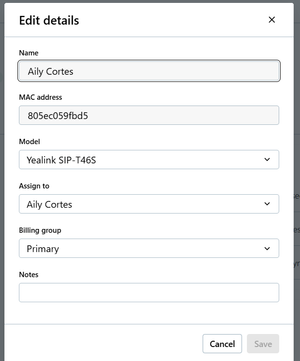
Currently in GoTo Admin, you cannot change the name of a device that has a user assigned to it, and there is no option to turn off syncing with assigned user's name, only the option to turn of syncing the display name (which is different) with the assigned users, see below: This is an issue because when you change assigned users, it does not update the Device name to the new user, it keeps the old one for some reason. Also, sometimes customers want a name other than the assigned user's name for a device, like Warehouse, Shop, or another department. Currently, the only way to change the name is to clear out the Assigned User field, type in the name you want, then put an assigned user in and save. While this workaround is simple, it is still inconvenient and does not look good to customers.25Views0likes2Comments
Notification for Email Domains Ending up in Bounce Filter
Hi! I don't know if anyone else has been having this problem, but I have run into a time or two where my company emails are getting caught in Goto's bounce filter without any notification. This results in my centers going a significant amount of time without realizing that they are not receiving voicemails being sent over from their phones. I'd love if there was a system in place that could notify us if any of our emails end up in the bounce filter. Maybe an automated call or a secondary email that could be set to receive these notifications? Maybe the system could scan for email domains, like Company.com? Essentially, we have optical departments that have phones in phone groups that ring but when staff are busy helping in-office patients callers end up leaving voicemails for staff to handle at a later time. I have voicemails set to delete off the phones as they transfer to email to avoid voicemail boxes filling up (the whole reason for this setup). I have had about 2-3 emails end up in the bounce filter for being undeliverable for a moment (not sure why) and Goto's system immediately blacklists that email. I have no idea this happens or that there is even an issue until enough patients complain to staff, and staff find enough time to tell me. My last email to trip this situation went unnoticed for almost 4 months! I know my staff should have caught this sooner, but it can be hard to tell there is a problem when you are working through high volumes of voicemails. You really only notice when you reach the end, and no other voicemails have arrived in the past day or so. Searched for issues similar to this and haven't found any topics like this, so I figured I would bring it up.47Views0likes4Comments
AI Receptionist Transfers
We need AI receptionist to support warm transfers, giving the recipient the choice to accept or decline incoming calls. If the recipient declines, the AI Receptionist should automatically route the caller to voicemail. Additionally, we want the option for certain extensions to send calls directly to voicemail, without requiring the extension to be set to Do Not Disturb.18Views0likes0CommentsMass Text Message - Marking as Read
Our team uses shared inboxes for text messaging to speak with customers and if an employee is off for a day and they come back the next day, they have to manually click through each text message to mark it as read because the other employee already took care of the response the day before. I am suggesting a mass clearing of text messages when they have already been read by someone else.12Views1like0Comments
Holiday Hours Prescheduled yearly
The goto connect system does not currently provide an easy way to link more than 1 holiday at a time for times closed and limited hours to the PBX system. So the user needs to log into the PBX after each holiday to set the times and recordings for the next holiday. It would be very beneficial if a LINK can be created for a holiday schedule/recording for each holiday date entered into the system. Then the system would know this business is closed for Thanksgiving and play this recording and then automatically go to the regular schedule the next day, and know the next holiday is (For ex) Christmas eve and the business is open limited hours and play this recording on Christmas eve, etc.202Views7likes7Comments
Search Engine on Texting
It would be wonderful to have a Search Engine on the texting app. We find that we have to type in the entire customer cell number and hit a period in order to just pull up a previous text, so we can review information. We need to be able to search without having to bump the messages. That way we don't have to bother the customer.93Views4likes5CommentsNeed to have auto reply for text messages
Similar to emails, Gotoconnect needs the ability to have a customized automatic responder to people who send text messages. For example, if "John Doe" sends a text message to a Gotoconnect phone number, the recipient (i.e., such as me) should have the ability to create an automatic customized text message, particularly if the recipient will be away from the office for a certain period of time. Right now, on the Gotoconnect mobile app, there is a text autorespond feature for only incoming phone calls. Which makes no sense to have it since anyone who calls can get a voicemail message.4.4KViews7likes22Comments
Different Ringtones for Different Call Routing (Softphone)
Problem Statement I use GoTo to receive calls from several different sources. Sometimes it's an internal call from my team, sometimes it's an after-hours support call, and sometimes it is a call to my direct business line. I would like to set a different ringtone for each of these different cases. One specific issue for me is that I am used to hearing the generic GoTo ringtone in the middle of the night, early mornings, when I am on a 24/7 oncall. I hear the same ringtone when I get an important business call in the middle of the day. I would love for my brain to be able to dissociate these two cases. Proposed Solution I would like the option to select specific ringtones that correspond to specific call routing, or at least to specific numbers. Minimum Implementation The ability in admin center or client app to set a specific ringtone for a specific number. Final Design The ability on the client app to be able to robustly customize ringtones by call routing. I can customize the ringtone per customer calling, per call routing, per number the customer is calling, etc. Benefit When I receive a call, I can immediately judge its urgency and some customer context by the ringtone. This will help our entire organization triage calls, and it will help us overcome the phycological discomfort associated with specific ringtones.26Views1like2Comments