Reporting
94 Topics
Cannot Change Device Name - Add 'Use the Assigned User's Name' toggle to GoTo Admin
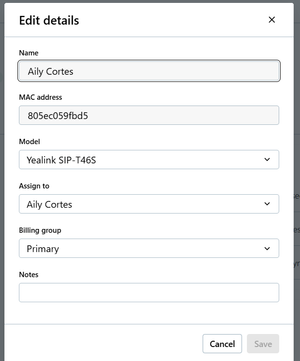
Currently in GoTo Admin, you cannot change the name of a device that has a user assigned to it, and there is no option to turn off syncing with assigned user's name, only the option to turn of syncing the display name (which is different) with the assigned users, see below: This is an issue because when you change assigned users, it does not update the Device name to the new user, it keeps the old one for some reason. Also, sometimes customers want a name other than the assigned user's name for a device, like Warehouse, Shop, or another department. Currently, the only way to change the name is to clear out the Assigned User field, type in the name you want, then put an assigned user in and save. While this workaround is simple, it is still inconvenient and does not look good to customers.23Views0likes2Comments
Displaying Call reports Day wise while generating reports Weekly or Monthly.
Currently the report shows the total number of calls aggregated for the selected date range (e.g., last 7 or 30 days). Could we add a feature to view this data broken down by day? It would be great to see the daily volume trends within those date ranges.14Views0likes0Comments
Report to display all results of Remote Execution Jobs
I would like a report that i can export details of a completed Remote Execution job. I need to know what devices were successful, what failed, and who the last logged in user was. When I export, i can only get the successful device, no info on last logged in user, and no exportable info on failed devices19Views1like0CommentsDashboard only access & customisation
It would be great to have a dedicated account or way of accessing the dashboard only without access to all other GoTo Resolve admin functions. E.g. showing the dashboard on monitoring screens. It would also be nice to be able to add/remove widgets to the dashboard to make it more relevant to your own needs.11Views0likes0Comments
Voicemail report under the call reports
I saw a few other suggestions on this but I also want to suggest that there should be some type of voicemail report under the call reports. Managers should have visibility into voicemails to ensure that team members are handling voicemails. Also, there should be an option to retrieve deleted voicemails as well. Goto really needs to look into enhancing this and making this an option as I know I am not the only client who would have a need for this.524Views4likes7Comments
GoTo Call Reports-User Activity
Please leave the Call Reports-user activity the way that it is. When we run reports, we need to see all data, regardless of whether or not a call was answered. Viewing the report from the analytics tab does not give all the data like the weblink for reports shows. This report is vital and needs to show all data, not just data that has movement.33Views0likes2Comments
Add Question Tags to Q&A Reports
In a webinar, we're able to tag questions as answered, follow-up, etc. However, these tags are not reported in the Q&A report which makes it kind of pointless to mark them as follow-up since we can't see which ones to follow up on later. I'd like to request a column be added to the report that shows the tags.105Views5likes6Comments
Feature Request: Separate Fields for First Name and Last Name in Meeting Login
I would like to suggest an enhancement for the GoToMeeting product. Currently, when joining a meeting, participants are prompted to enter their name in a single field. As a result, many users only enter their first name, which can create confusion in larger meetings. It would be highly beneficial if the login interface could include two separate fields for First Name and Last Name. This change would help ensure that attendees provide both pieces of information consistently, improving meeting organization and participant identification.18Views0likes0Comments