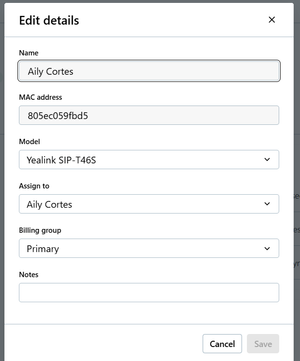
Cannot Change Device Name - Add 'Use the Assigned User's Name' toggle to GoTo Admin
Currently in GoTo Admin, you cannot change the name of a device that has a user assigned to it, and there is no option to turn off syncing with assigned user's name, only the option to turn of syncing the display name (which is different) with the assigned users, see below: This is an issue because when you change assigned users, it does not update the Device name to the new user, it keeps the old one for some reason. Also, sometimes customers want a name other than the assigned user's name for a device, like Warehouse, Shop, or another department. Currently, the only way to change the name is to clear out the Assigned User field, type in the name you want, then put an assigned user in and save. While this workaround is simple, it is still inconvenient and does not look good to customers.18Views0likes2Comments
Displaying Call reports Day wise while generating reports Weekly or Monthly.
Currently the report shows the total number of calls aggregated for the selected date range (e.g., last 7 or 30 days). Could we add a feature to view this data broken down by day? It would be great to see the daily volume trends within those date ranges.
Voicemail report under the call reports
I saw a few other suggestions on this but I also want to suggest that there should be some type of voicemail report under the call reports. Managers should have visibility into voicemails to ensure that team members are handling voicemails. Also, there should be an option to retrieve deleted voicemails as well. Goto really needs to look into enhancing this and making this an option as I know I am not the only client who would have a need for this.520Views4likes7Comments
GoTo Call Reports-User Activity
Please leave the Call Reports-user activity the way that it is. When we run reports, we need to see all data, regardless of whether or not a call was answered. Viewing the report from the analytics tab does not give all the data like the weblink for reports shows. This report is vital and needs to show all data, not just data that has movement.32Views0likes2Comments
Call report of calls taken at each extension
I am trying to get a call report of calls taken at each extension. When I run the reports the numbers are WAY off. I assume they are counting calls to a ring group that are answered elsewhere. That doesn't do much good. Am I missing something to get a report of just the calls the extensions answer.35Views0likes3Comments
Automatic Agent Logout Based on System Schedule
I'd like to propose implementing an automatic logout feature that would log agents out of queues on configured schedules. This functionality would ensure agents are automatically disconnected at the end of their scheduled shifts, eliminating the need for manual intervention. Currently, the absence of this feature is creating operational challenges. Agents who remain logged in beyond their scheduled hours are skewing availability metrics and creates inconsistent reports. Additionally, this impacts accurate reporting of agent productivity and call distribution analytics, as the system cannot distinguish between scheduled and unscheduled availability. An automatic logout feature aligned with existing system schedules would resolve these issues while improving overall call center efficiency and data accuracy.28Views0likes1Comment